
Modbus RTU not responding: a diagnostic sequence
Timeouts, CRC errors and silent devices, worked from what you can observe. Two minutes with a multimeter settles the two commonest causes.
A Modbus bus that will not answer is a miserable thing to debug, because every layer can produce the same symptom. Wrong baud rate, reversed A and B, a missing terminator, a duplicated unit ID and a dead device all present identically: the master waits, nothing comes back, the log says timeout.
The way out is to stop guessing at causes and start from what you can actually observe. Three symptoms, three different searches — and the first two measurements take a multimeter and about two minutes.
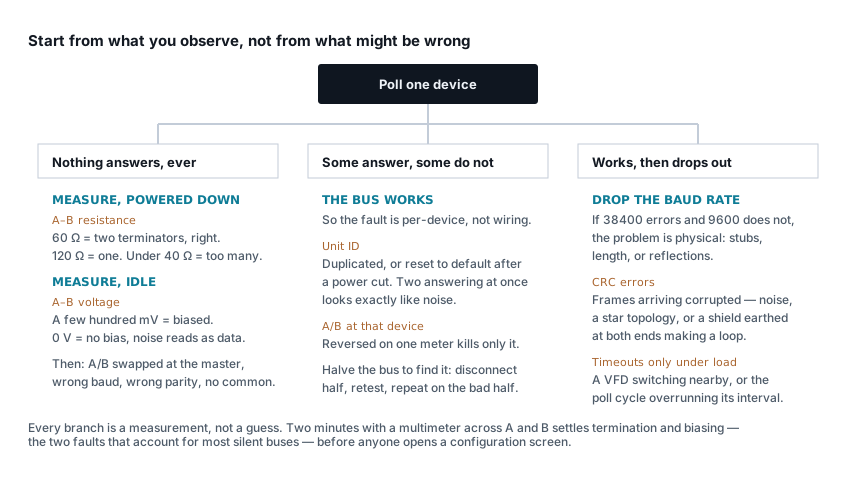
Nothing answers, ever
If no device on the bus responds, the fault is almost certainly common to all of them: the wiring, the electrical layer, or the serial settings. Two measurements narrow it down before you open any software.
Power everything down and measure resistance across A and B.
| Reading | Means |
|---|---|
| ~60 Ω | Two 120 Ω terminators, one at each end. Correct. |
| ~120 Ω | Only one terminator fitted. Usually works, marginal on long runs. |
| Under 40 Ω | Too many. Somebody enabled every device's termination jumper. |
| Open circuit | A break in the pair, or nothing terminated at all. |
Too many terminators is the one people do to themselves. Five devices with their jumpers on present about 24 Ω, the drivers cannot pull that hard, and the differential signal collapses.
Power up, poll nothing, and measure DC volts across A and B. An idle bus with fail-safe biasing sits a few hundred millivolts positive. Zero means no biasing anywhere, and noise on a floating bus gets read as the start of a character. Bias at one point only, normally the master.
If both measurements are good, work through the settings that must match on every device: baud rate, data bits, parity — the one people forget, and 8N1 versus 8E1 produces exactly this symptom — and stop bits. Then check A/B polarity at the master, because reversing it there kills the whole bus while reversing it at one device kills only that device.
One more, easy to miss: the signal common. RS485 transceivers have a common-mode range of about −7 V to +12 V relative to their own ground. Two devices in the same panel always sit inside it. A device in a building 200 m away, fed from a different board, may not — and it will be silent for reasons no amount of configuration will fix. Run a third conductor.
Some devices answer, some do not
This is the useful symptom, because it proves the bus itself works. The wiring, the baud rate and the termination are all fine, or nothing would answer. The fault is specific to the devices that are quiet.
Duplicated unit IDs are the commonest cause, and they produce a characteristic mess: two devices transmit simultaneously, the frames collide, and the master sees corrupt data that looks like electrical noise. Meters that reset to a default address after a power failure will do this to you weeks after commissioning, which makes it hard to connect to any change.
A/B reversed at one device kills that device and nothing else.
The device is not at the address you think. Some meters expose their unit ID only on the front panel, and it does not always match the label somebody stuck on the enclosure.
To find any of these on a bus of twenty: disconnect half. If the remaining half works, the problem is in what you removed. Halve again. Four or five iterations locate a bad device or a bad spur faster than any amount of staring at a wiring diagram.
It works, then drops out
Intermittent faults are physical until proven otherwise, and there is a single test that proves it.
Drop the baud rate. If errors disappear at 9600 that were present at 38400, the problem is the physical layer — reflections, stubs, length, or noise — and no configuration change will fix it. If the errors persist at every speed, look at the devices instead.
CRC errors mean frames are arriving corrupted. The bus is delivering something, so this is noise or reflection rather than a dead link. Usual causes, in order: a star topology or a long spur; a shield earthed at both ends, which turns it into a current loop rather than a screen; the pair run alongside VFD or contactor cabling; or a length beyond what the baud rate supports. The cable length calculator gives the limit for your baud rate and derates it for the environment.
Timeouts that appear under load are often not the bus at all. If a VFD starting correlates with the errors, it is conducted or radiated noise. If the errors correlate with nothing visible, check the poll cycle: twenty devices at five requests each with a one-second timeout is a cycle far longer than the interval it was configured for, and requests start colliding with the previous round.
One dead device slows everything. With a one-second timeout and two retries, a single unresponsive meter adds three seconds to every pass. Back failing devices off to progressively longer intervals rather than hammering them each cycle.
It answers, but the numbers are wrong
That is not a communication fault and none of the above applies. The bus is working — you are decoding what it sends incorrectly. Register offset, byte and word order, data type and scaling are a separate problem with a separate method: Modbus RTU on energy meters covers it, and the float decoder and address converter settle the two commonest cases in seconds.
Exception codes are good news
If you get an exception rather than silence, the device heard you and disagreed. That is enormous progress.
| Code | Means | Usually |
|---|---|---|
| 01 | Illegal function | Using FC03 on an input-register block, or FC04 on holding registers |
| 02 | Illegal data address | Register does not exist — check the 40001 offset |
| 03 | Illegal data value | Quantity out of range, or reading past the end of a block |
| 04 | Device failure | The meter's own fault, not yours |
| 06 | Device busy | Polling faster than it can answer |
Code 02 is the offset problem in disguise, and it is the most common of the set.
Quick reference
| Symptom | Layer | First thing to check |
|---|---|---|
| No device answers, ever | Physical / serial | A–B resistance, then parity |
| Some answer, some do not | Per-device | Duplicated unit IDs, A/B at that device |
| Was fine, now intermittent | Physical | Drop the baud rate — does it clear? |
| CRC errors under load | Noise | Shield earthed twice, or a VFD alongside |
| Timeouts that grow over the day | Poll design | Cycle overrunning its interval |
| Exception 02 | Protocol | The 40001 offset |
| Answers, values are nonsense | Decoding | Byte order or data type, not comms |
| One device slow, whole bus slow | Poll design | No back-off on a failing device |
The last row is worth designing for rather than diagnosing. A single dead meter with a one-second timeout and two retries adds three seconds to every pass, so one broken device makes twenty healthy ones look broken too.
The order that saves time
- Resistance across A and B, powered down.
- Idle voltage across A and B, powered up.
- Serial settings, parity included.
- A/B polarity at the master.
- Halve the bus if some devices work.
- Drop the baud rate if it is intermittent.
- Only then open the register map.
Steps 1 and 2 take two minutes and account for most silent buses. The design rules that prevent all of this — daisy chain, terminate both ends only, earth the shield once — are in RS485 wiring for Modbus.
Related articles
More on troubleshooting.
 Troubleshooting
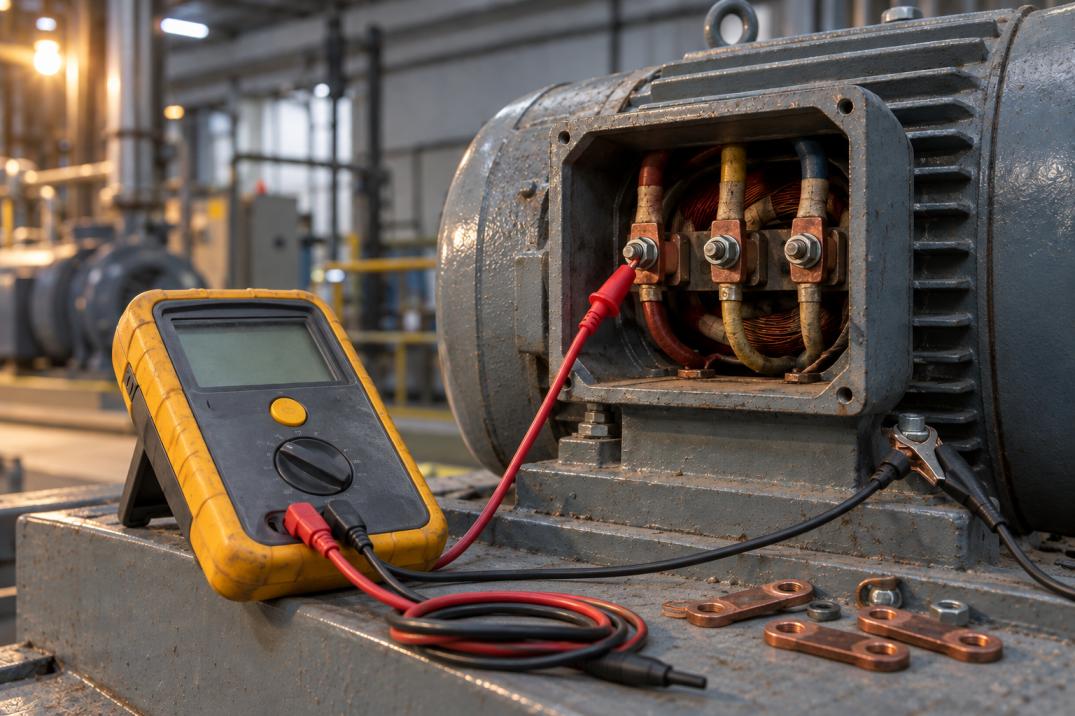
Insulation resistance test values: what passes, and when to reject
What a megger reading means: IS 732 and IEEE 43 limits, temperature correction, polarisation index, and the three things that fake a failure.
13 min read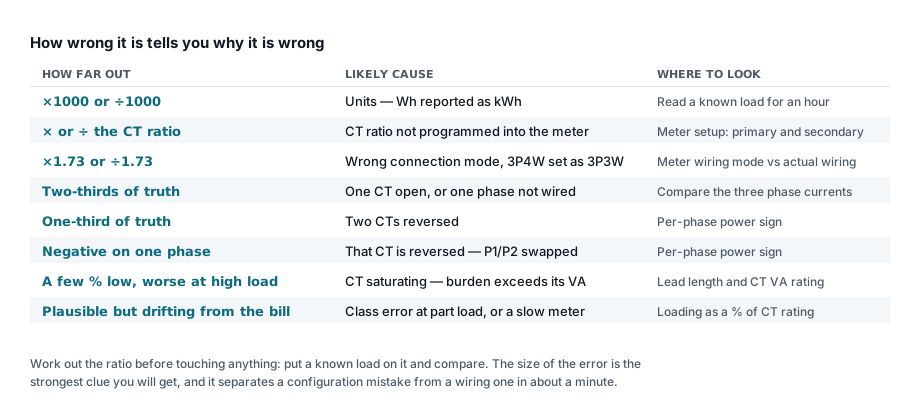 Troubleshooting
Energy meter showing wrong readings: a checklist
Work out how wrong it is first — the size of the error names the cause. Ratio errors, reversed CTs, saturation and the ones that look plausible.
7 min read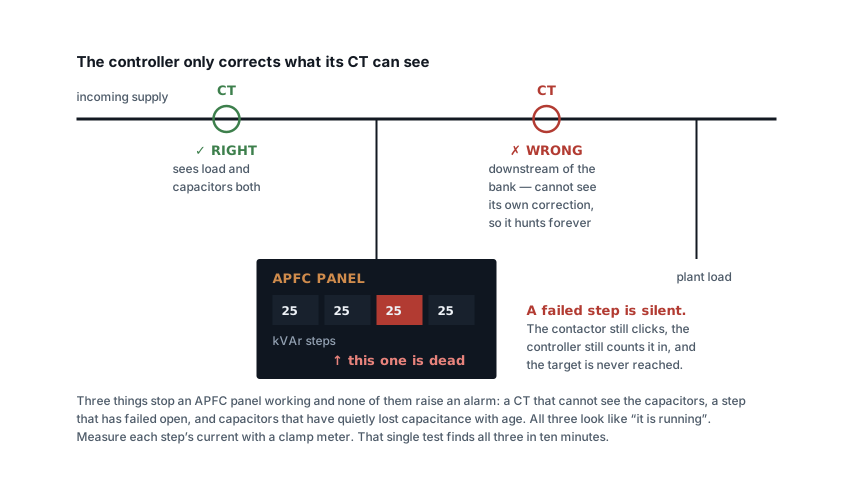 Troubleshooting
Power factor still poor after fitting capacitors: why
The bank is installed, the contactors click, and the bill has not moved. Six causes, ranked, and the one clamp-meter test that finds most of them.
7 min read Troubleshooting
MCCB keeps tripping: how to find out why
Time the trip first — it halves the search. Then work through overload, short circuit, earth fault and the causes that are not faults at all.
7 min read
Comments
Loading…