
PROFIBUS and PROFINET: how each is wired, and what breaks
Purple cable at 150 Ω against green Ethernet, powered termination against none, device addresses against device names — and the fault each design invites.
Most explanations of these two stop at "PROFIBUS is serial, PROFINET is Ethernet". That is true and it has never helped anybody wire a panel. The distinction that decides what you buy, how you terminate it and what fails at three in the morning is physical:
PROFIBUS is one pair of conductors that every device taps. PROFINET is a set of point-to-point links joined by switches. Everything else — addressing, termination, topology, diagnostics, the failure modes — follows from that one sentence.
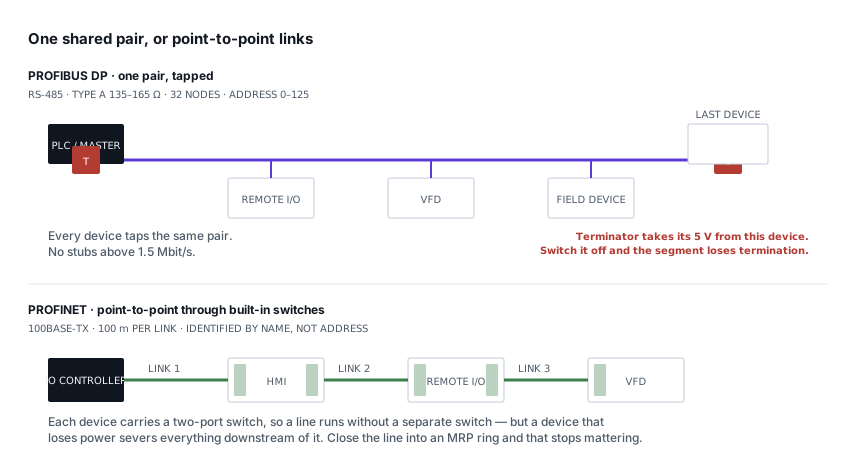
PROFIBUS DP: one cable, tapped along its length
PROFIBUS DP runs on RS-485, which will be familiar if you have wired Modbus RTU — but the similarity is close enough to be dangerous, and the differences are exactly where installations go wrong.
The cable is the first one. PROFIBUS specifies Type A cable: 135–165 Ω characteristic impedance, around 30 pF/m, 0.34 mm² conductors, and it is purple because the specification says so. Generic RS-485 and Modbus cable is commonly 120 Ω. It will appear to work on a short segment at low baud and fail unpredictably as you lengthen the run or raise the speed, which is the worst way for anything to fail.
Speed and distance trade against each other, per segment:
| Baud rate | Maximum segment |
|---|---|
| 9.6 – 187.5 kbit/s | 1000 m |
| 500 kbit/s | 400 m |
| 1.5 Mbit/s | 200 m |
| 3 – 12 Mbit/s | 100 m |
A segment carries 32 devices maximum, counting repeaters. Beyond that you add a repeater and start a new segment; the address space runs 0 to 125, with 126 reserved for commissioning a device that has not been given an address yet.
The termination trap, which is the one worth reading
On Modbus you terminate a segment with a 120 Ω resistor across the pair. Two resistors, one at each end, job done.
PROFIBUS termination is an active network, and it needs power. The terminator is a 390 Ω pull-up to +5 V, 220 Ω across the pair, and a 390 Ω pull-down to ground. It biases the line to a defined idle state as well as matching the impedance, and it draws that 5 V from pins 5 and 6 of the D-sub connector — which means from the device it is plugged into.
The consequence catches people every time:
Switch off the device at the end of the segment, and you have not just removed a node. You have removed the termination.
Isolate a drive at the end of a run for maintenance and the whole segment can start throwing intermittent faults that have nothing to do with the drive. The same happens if somebody unplugs the connector but leaves the terminator switch on, or fits the terminator at the second-to-last device because the last one was added later.
Two habits avoid all of it: put the segment ends on devices that are never isolated independently, or use a standalone powered terminator so the segment does not depend on any device staying energised.
Stubs are not a shortcut
A spur off the main run — a stub, or drop line — is permissible only at low baud and only briefly. At 1.5 Mbit/s and above, effectively zero. The reflection off an unterminated stub end arrives back on the bus inside the bit period and corrupts it.
The correct way to reach a device is in and out of its connector, so the trunk passes through the device rather than branching to it. PROFIBUS D-sub connectors have two cable entries for precisely this reason: incoming and outgoing, with the shield bonded through.
PROFINET: point-to-point, and the switches are inside the devices
PROFINET is 100BASE-TX Ethernet — 100 Mbit/s, full duplex, 100 m maximum per copper link. That 100 m is per hop, not per network, which is a much more generous constraint than it first appears.
Line topology works, and it is what you see in most panels, because PROFINET devices contain a two-port switch. The cable goes into port 1 and out of port 2 to the next device. There is no bus being tapped: each link is its own collision-free full-duplex connection, which is why speed does not fall as you add devices the way it does on a shared serial bus.
Cable is green, and for 100 Mbit/s it carries two pairs. Use PROFINET-rated cable rather than office patch lead: it is specified for the mechanical and electrical environment, usually solid-core for fixed installation, and the connectors are IP20 RJ45 in a panel or D-coded M12 in the field.
Names, not addresses — and the fault that follows
This is the conceptual break from anything you have done with Modbus TCP, where the IP address is the device's identity.
A PROFINET device is identified by its name of station. The IO controller finds devices by name using DCP, then assigns the IP address at startup. You configure the name; the controller handles the addressing. Replace a failed drive, give the new one the same name, and it picks up the old one's IP and configuration without you touching the network settings.
Which produces the most common PROFINET fault on a panel that was working yesterday: two devices with the same name. A replacement unit arrives pre-named from another job, or a commissioning engineer names two remote I/O racks identically. The controller cannot resolve which is which and the station fails to come online — with a fault message that points at the network rather than at the name.
What line topology costs you
Because each device passes traffic through to the next, a device that loses power takes down everything downstream of it. On a bus, one dead node is one dead node; on a PROFINET line, a dead node in the middle is a severed network.
The fix is MRP — Media Redundancy Protocol. Close the line into a ring, give one device the manager role, and it keeps one port blocked until it detects a break, then opens it. Recovery is typically within 200 ms, fast enough that most processes never notice. It costs one extra cable run back to the panel, and on anything where downtime is expensive it is the cheapest resilience available.
Real time, and why an office switch will not do
Standard PROFINET RT does not send its cyclic data over TCP/IP at all. It uses Ethernet frames with EtherType 0x8892 and a VLAN priority tag, handled below the IP stack, so the latency of the protocol stack never enters the cycle. IRT — isochronous real time — goes further and reserves scheduled time slots in hardware for motion control.
Two practical consequences:
- An unmanaged consumer switch may strip or ignore the priority tag, so RT traffic queues behind a firmware download and your update watchdog expires. Use a managed industrial switch that honours priority.
- Because RT is not IP traffic, you cannot route it. It stays inside its broadcast domain. Crossing subnets needs a controller-level solution, not a router.
A PROFINET station typically drops out after three missed cycles. At an 8 ms update time, that is 24 ms from a problem starting to a station fault — which is why marginal cabling shows up as sporadic dropouts rather than as degraded performance.
Shield and bonding, where both protocols agree
Both use shielded cable and both want the shield bonded at every point, with a 360° connection, not a pigtail to a terminal. EMC glands or the metal shells of the connectors do this properly.
The objection you will hear is that bonding at both ends creates a current path between panels at different earth potentials. It does — and the answer is not to lift the shield, but to run an equipotential bonding conductor alongside the data cable so that current has a low-impedance path that is not the shield. Lift one end instead and you have a shield that works against capacitive coupling and does nothing against the magnetic coupling that causes most industrial noise.
If you have wired RS485 for Modbus, this is the same discipline, and the RS485 wiring rules transfer directly.
What actually breaks
| Symptom | Look at first |
|---|---|
| PROFIBUS faults after maintenance | End-of-segment device switched off — termination lost with it |
| Intermittent PROFIBUS errors that worsen with speed | Wrong cable impedance, or a stub that was tolerable at low baud |
| One PROFIBUS device never appears | Duplicate address, or address left at 126 |
| PROFINET station will not come online | Duplicate name of station |
| PROFINET line dead beyond a certain cabinet | Device in the middle unpowered — it was passing the traffic |
| Sporadic PROFINET dropouts under load | Unmanaged switch discarding priority, or a link over 100 m |
Which to specify
For anything new, PROFINET — for diagnostics more than speed. Every device is reachable by standard Ethernet tooling, you can mirror a port and capture traffic with Wireshark, and device replacement by name is genuinely faster on a breakdown.
PROFIBUS remains correct where you are extending an existing segment, where the field devices you need only exist with DP interfaces, or where the run is longer than 100 m and pulling fibre or adding switches is not proportionate. It is a mature, well-understood protocol and there is nothing wrong with specifying it deliberately. There is a great deal wrong with specifying it by accident, because that is how a segment ends up with 120 Ω cable, a passive terminator and an intermittent fault nobody can find.
For moving that data onwards to a server or a dashboard, the same questions apply as for any other fieldbus — see MQTT, Modbus TCP or HTTP.
Related articles
More on metering & iot.
 Metering & IoT
Turning meter data into savings: baselines, KPIs and alerts
Why total kWh is a useless measure, how to build an energy baseline against production, and the four analyses that actually find money in metering data.
6 min read Metering & IoT
Building a Modbus energy monitoring gateway that stays up
Polling design, store-and-forward, timestamping at the edge, SD card wear and the naming convention you cannot change later — a field-grade gateway.
7 min read Metering & IoT
MQTT, Modbus TCP or HTTP: moving meter data to a server
Poll versus publish, what each protocol costs in bandwidth and firewall holes, how to design topics and payloads, and where each one genuinely belongs.
7 min read Metering & IoT
Choosing an RS485 to Modbus TCP gateway
Transparent tunnel or protocol gateway, multi-master handling, unit ID mapping and isolation — the specification that decides whether it works in year two.
7 min read
Comments
Loading…