
Building a Modbus energy monitoring gateway that stays up
Polling design, store-and-forward, timestamping at the edge, SD card wear and the naming convention you cannot change later — a field-grade gateway.
Reading a Modbus meter from a Raspberry Pi takes about fifteen lines of Python. Building something that runs unattended in a plant room for three years, through power cuts, broadband outages and somebody unplugging it to charge a phone, is a different exercise.
The gap between those two is not clever code. It is a handful of design decisions, most of which are painful to change once data collection has started.
The shape of it
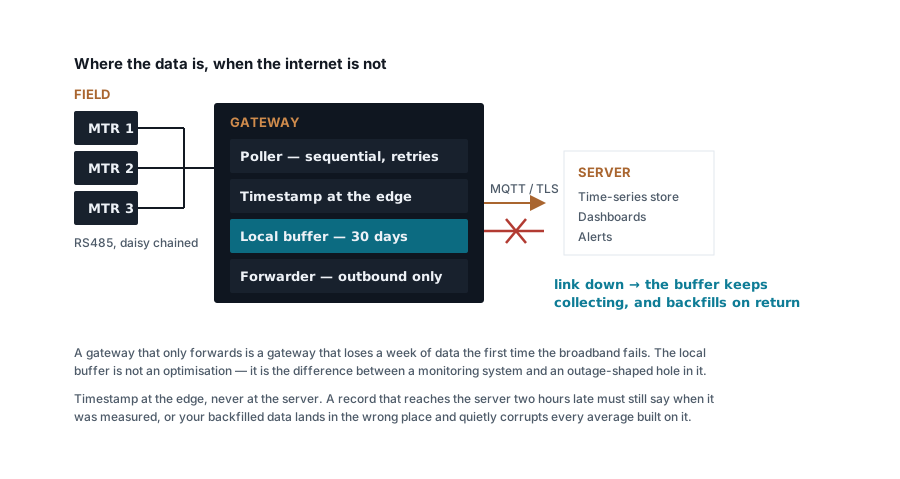
Four responsibilities, and it is worth keeping them separate in the code as well as in your head:
- Poll the field bus on a schedule.
- Timestamp each reading at the moment it was taken.
- Buffer locally, with enough retention to survive a long outage.
- Forward to wherever the data lives, and backfill what was missed.
A gateway that skips step 3 works perfectly until the first network outage, and then has a hole in it that nobody can reconstruct.
Hardware, and the two things that actually fail
Any Linux single-board computer will do the computing. What matters is what kills them in the field.
Power. Plant-room supply is not clean and outages are not graceful. Use a DIN-rail 24 V supply with a small UPS or a supercapacitor hold-up, so the gateway shuts down cleanly rather than losing power mid-write. A hardware watchdog that reboots a hung system is worth more than a faster processor.
Storage. SD cards die from write cycles, and a naive logger writing every reading to an SD card will kill one within a year. Either use industrial-grade storage rated for the write volume, or write to RAM and flush to disk in batches every few minutes. Keep logs on tmpfs with a size cap, and mount the root filesystem read-only if you can — most gateway "failures" are corrupted filesystems after an ungraceful power loss.
For the RS485 interface, use a properly isolated converter, ideally on DIN rail rather than a USB dongle hanging off the board. Isolation protects the gateway from potential differences on a bus that may run across a building, and a screw-terminal converter cannot be unplugged by accident.
Polling design
Modbus RTU is half duplex: one conversation at a time on the whole bus. The poller must be strictly sequential — issue a request, wait for the response or a timeout, then move on.
| Decision | Sensible value | Why |
|---|---|---|
| Poll interval | 5–15 s | Energy is an integral. Sub-second polling adds no information |
| Response timeout | 300–1000 ms | Long enough for a slow meter, short enough not to stall the cycle |
| Retries | 2, then skip | A third attempt rarely succeeds where two failed |
| Backoff for dead devices | Exponential, capped at ~5 min | One dead meter must not slow the other nineteen |
| Registers per request | As many contiguous as the meter allows | One request for eight registers beats eight requests |
Back-off is the setting that separates a robust poller from a fragile one. When a meter dies, a naive poller keeps trying it every cycle, spending its timeout on every pass and delaying everything else. Drop a failing device to progressively longer intervals, and keep polling it occasionally so it rejoins automatically when it is fixed.
Budget the cycle before you build. Twenty meters × (1 request + 200 ms response) is comfortably inside a 15-second cycle. Twenty meters × 5 requests each × a 1-second timeout is 100 seconds when things go wrong, and your 15-second interval was fiction.
Timestamp at the edge, always
Every reading gets its timestamp on the gateway, at the moment of reading, in UTC.
Timestamping at the server seems simpler and it destroys your data the first time a backlog is flushed. Two hours of buffered readings arriving in ten seconds all get stamped with the same ten seconds, and every average, every daily total and every baseline built on that data is wrong — silently, and irreversibly.
That means the gateway needs a real clock. NTP where there is a network, plus a battery-backed RTC for the case that matters: a site that loses power and network together and comes back with no idea what time it is. Without an RTC, a gateway that reboots during an outage stamps everything from 1970 until the network returns.
Naming is the decision you cannot revisit
Every reading needs to say what it is. Settle the convention before the first meter is polled, because renaming a year of history is far harder than it sounds and half of it never gets done.
A workable structure is site, area, equipment, measurement:
site / building / panel / feeder / quantity
plant1 / shed2 / mcc3 / compressor-1 / kwh_import
Rules worth adopting:
- Identify by role, not by hardware.
compressor-1, notmeter-7. When the meter is replaced the history stays continuous. - Store the unit and scale explicitly, and store everything in SI base units.
A field called
powerthat is sometimes kW and sometimes W will cost you a day. - Keep a device registry — unit ID, register map version, CT ratio, install date, location — as a file in version control, not as configuration typed into a running system. It is the only record of why a number is what it is.
Store the CT ratio in the registry, not in the meter where you can help it. When someone changes a CT you want a dated change in the registry rather than a silent step in the data.
Storage and retention
A time-series database is the right tool. Whichever you choose, decide the retention policy at the start:
| Data | Keep |
|---|---|
| Raw readings at poll interval | 30–90 days |
| 1-minute aggregates | 1 year |
| 15-minute aggregates | Forever — this matches the utility's demand window |
| Daily totals | Forever |
The 15-minute aggregate is the important one: it is what reconciles against the DISCOM bill and what any maximum-demand analysis needs. Keep it at full fidelity and downsample everything else without regret.
Security, briefly but seriously
Modbus has no authentication and no encryption. Anything that can reach the bus can write to it, and a write to the wrong register can reconfigure a meter.
- Never expose Modbus TCP to the internet. Not on a non-standard port, not behind a NAT rule.
- Outbound connections only. The gateway should connect out to a broker or an API over TLS. No inbound ports, no port forwarding.
- Remote access via VPN or a reverse tunnel, not an open SSH port.
- Poll with read-only function codes. If the application never needs to write, make writing impossible in the code rather than merely unused.
- Separate the OT network from office IT with a firewall, even if it is just a VLAN.
Monitoring the monitor
The failure mode nobody plans for is silence. A gateway that stops sending looks exactly like a plant that stopped consuming, and a dashboard that shows a flat line at zero is entirely believable at 3 a.m. on a Sunday.
- Publish a heartbeat on a fixed interval, and alert on its absence rather than on the data.
- Use MQTT's last will and testament so the broker announces the gateway's death for it.
- Report per-device poll success rate as a metric. A meter drifting from 100 % to 92 % is telling you about the RS485 bus weeks before it drops off entirely.
- Alert on stale data, not just on bad values.
Before you scale it up
Commission one meter completely — correct CT, correct register offsets, correct byte order, verified against a clamp meter — before you install twenty. Then confirm the whole chain end to end: pull the network cable and verify the buffer fills; restore it and verify the backfill lands at the right timestamps; power-cycle the gateway and verify it comes back without intervention.
A system that survives those three tests on the bench will survive the plant room. One that has not been tested that way will teach you the same lessons later, with a gap in the data where the lesson was.
Related articles
More on metering & iot.
 Metering & IoT
PROFIBUS and PROFINET: how each is wired, and what breaks
Purple cable at 150 Ω against green Ethernet, powered termination against none, device addresses against device names — and the fault each design invites.
8 min read Metering & IoT
Turning meter data into savings: baselines, KPIs and alerts
Why total kWh is a useless measure, how to build an energy baseline against production, and the four analyses that actually find money in metering data.
6 min read Metering & IoT
MQTT, Modbus TCP or HTTP: moving meter data to a server
Poll versus publish, what each protocol costs in bandwidth and firewall holes, how to design topics and payloads, and where each one genuinely belongs.
7 min read Metering & IoT
Choosing an RS485 to Modbus TCP gateway
Transparent tunnel or protocol gateway, multi-master handling, unit ID mapping and isolation — the specification that decides whether it works in year two.
7 min read
Comments
Loading…