
Choosing an energy meter for IoT: what actually matters
Accuracy class, register map, protocol and documentation — the four things that decide whether a meter becomes a data source or an expensive display.
Energy meters are sold on accuracy class and price. Neither predicts whether the meter will be any use in a monitoring system. The meters that cause months of trouble are usually accurate, cheap and completely correct — they just cannot tell you anything, or they will not tell you in a way you can read.
Four things decide it, and only one of them appears prominently in the catalogue.
1. How the data gets out
| Output | Gives you | Good for |
|---|---|---|
| Pulse (SO) | Energy only, as counts | Cheapest retrofit, sub-billing where nothing else matters |
| Modbus RTU over RS485 | Everything in the register map | The default for industrial metering. Cheap, robust, long runs |
| Modbus TCP | The same map over Ethernet | Where structured cabling already exists |
| MQTT-native | Publishes on its own | Convenient, but you are tied to the vendor's schema and cloud |
| M-Bus | Common on European water and heat meters | Rare on Indian electrical meters |
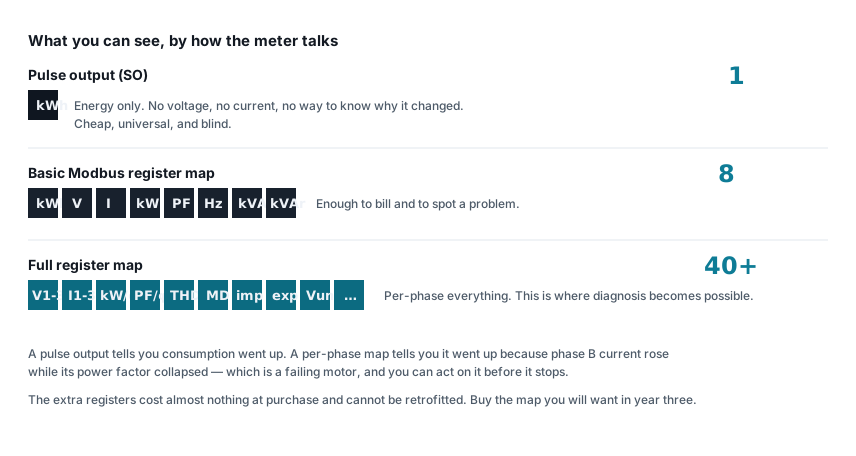
Pulse outputs are blind. A pulse tells you a quantum of energy passed. It cannot tell you the voltage sagged, the power factor collapsed, or one phase is missing. If the only question you will ever ask is "how many units", pulse is fine and cheap. Every diagnostic question needs a register map.
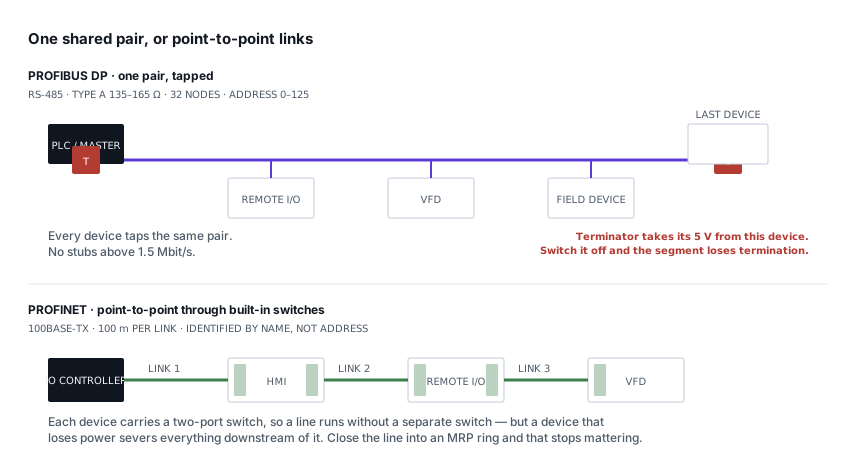
Modbus RTU is still the right default for most Indian installations. It runs over two wires for a kilometre, costs nothing per node, and every gateway on earth speaks it. Its limitations — no self-description, no discovery, polling only — are real but manageable.
Be wary of meters that only talk to the manufacturer's own cloud. It works beautifully in the demonstration and it means your data lives somewhere you do not control, in a schema you cannot change, for as long as that vendor supports that product.
2. The register map, and whether you can get it
This is the single biggest practical differentiator, and it is never in the datasheet.
Before buying, ask the supplier for the Modbus register map as a document. What you learn from the answer:
- It arrives within a day, as a proper PDF with addresses, data types, scaling and byte order. Good sign. This vendor has done this before.
- It arrives as a photograph of a page from a manual. Workable, but expect ambiguity.
- "Our engineer will configure it at site." Walk away. You are buying a dependency, not a meter.
- No answer. The map may not exist in written form at all.
Read the map before ordering and check for these specifically:
| Check | Why |
|---|---|
| Addressing convention stated | 40001-style or protocol address? An off-by-one here wastes a day — see the address converter |
| Data type per register | 32-bit float, 32-bit integer with a scale factor, or 16-bit? |
| Byte and word order documented | The single most common cause of nonsense readings |
| Function code | FC03 holding registers or FC04 input registers — meters differ |
| Which registers are not implemented | Gaps in a map return garbage rather than an error |
| Energy register width | A 16-bit kWh register wraps at 65,535 and you must handle rollover |
That last one catches people months in. If the map does not say, read the register on a known load and watch what it does.
3. Accuracy class — and where it actually applies
| Class | Error | Use |
|---|---|---|
| 0.2S | ±0.2 % | Revenue metering at HT |
| 0.5S | ±0.5 % | Sub-billing, tenant metering, energy allocation |
| 1.0 | ±1.0 % | Monitoring, trending, fault-finding |
| 2.0 | ±2.0 % | Indication only |
For monitoring — finding waste, spotting a failing motor, comparing shifts — class 1.0 is entirely adequate. For anything where money changes hands between parties, use 0.5S and be prepared to defend it.
The class only describes the meter. The system's accuracy is the meter and the CT, and the CT is usually the weaker link — particularly at part load, where a plain class 0.5 CT is outside its specified range entirely. That argument is in CT ratio and burden, and it is worth reading before spending money on a better meter class.
Check the class is stated for the class of connection you have: some meters are class 1.0 for active energy but class 2.0 for reactive, and reactive is what your power factor calculation depends on.
4. The registers you will want later
Buying the minimum map is a decision you cannot revisit without replacing hardware. Insist on:
- Per-phase voltage, current, power and power factor — not just totals. Diagnosis is almost always about the difference between phases.
- Import and export energy separately. Essential the day solar is added, and useful immediately for spotting a reversed CT.
- kVA and kVAr, so you can track power factor against the tariff penalty.
- Maximum demand, with the integration period the DISCOM uses. This is the register that reconciles your system against the bill.
- THD, if there are any VFDs on site. It is the early warning for harmonic problems.
- Frequency and voltage unbalance — cheap to record, and the fastest way to prove a supply-side problem is not yours.
Direct connected or CT operated?
Meters up to about 63 A connect directly. Above that, CTs.
Direct connection is simpler, cheaper and has one fewer error source, so use it where the load allows. But a direct-connected meter must be able to carry the full load current through it — which means the meter is in the power path and replacing it means an outage. A CT-operated meter can be swapped live, with the CT secondaries shorted first.
For retrofits, split-core CTs avoid disconnecting anything. They are slightly less accurate and they must be properly closed and clean on the mating faces.
Practical checks before you commit
- Ask for the register map. Do not order without it.
- Buy one and bench it. Wire a single meter, poll it, read voltage, and confirm the byte order matches the document. An afternoon here saves a fortnight of site debugging — the float decoder makes it a two-minute job.
- Check the baud rates and unit ID range. A meter that only supports 9600 and unit IDs 1–31 constrains your bus design.
- Confirm the response time. Some meters take 200 ms to answer, which caps how many you can poll on one bus at a useful interval.
- Check what it does at power-up. Does it restore its configured unit ID and baud, or default back? Meters that reset their address on power failure will find you eventually.
- Check the energy register survives power loss. It should be in non-volatile memory. Verify by switching it off.
The mistake worth avoiding
Buying twenty meters before commissioning one. Every issue in this post is cheap to discover on a single unit on a bench and expensive to discover on twenty units in an occupied building.
Buy one, poll it, read the register map against reality, then order the rest. If the meter passes that afternoon, the rest of the project is bus wiring and software — both of which are problems you can solve.
Related articles
More on metering & iot.
 Metering & IoT
PROFIBUS and PROFINET: how each is wired, and what breaks
Purple cable at 150 Ω against green Ethernet, powered termination against none, device addresses against device names — and the fault each design invites.
8 min read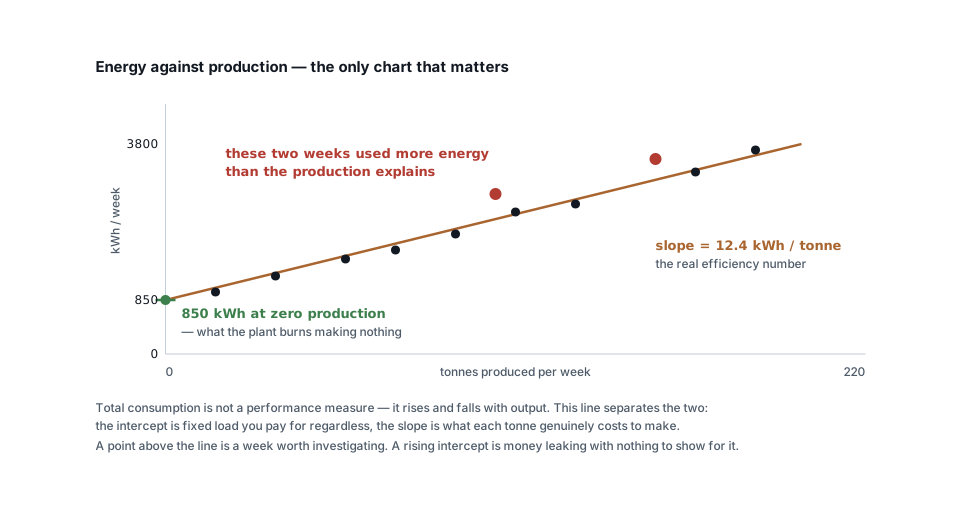 Metering & IoT
Turning meter data into savings: baselines, KPIs and alerts
Why total kWh is a useless measure, how to build an energy baseline against production, and the four analyses that actually find money in metering data.
6 min read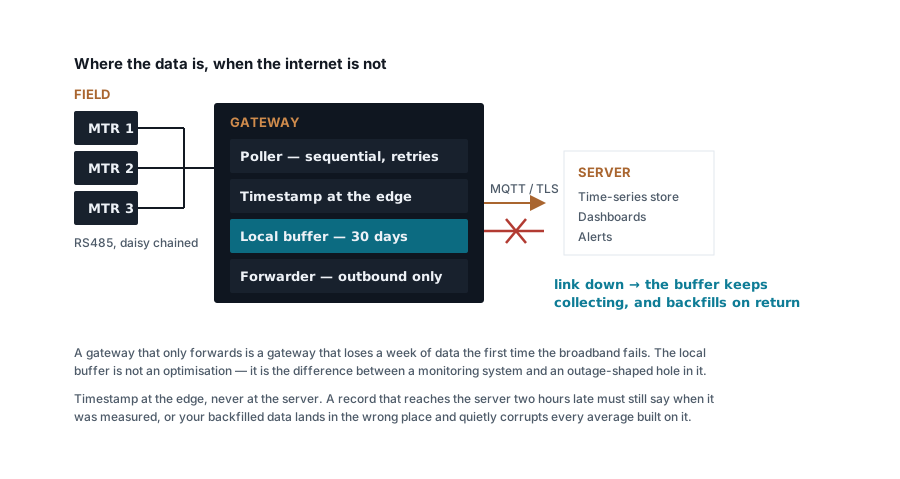 Metering & IoT
Building a Modbus energy monitoring gateway that stays up
Polling design, store-and-forward, timestamping at the edge, SD card wear and the naming convention you cannot change later — a field-grade gateway.
7 min read Metering & IoT
MQTT, Modbus TCP or HTTP: moving meter data to a server
Poll versus publish, what each protocol costs in bandwidth and firewall holes, how to design topics and payloads, and where each one genuinely belongs.
7 min read
Comments
Loading…